June 2016

how to take a screenshot on iphones device
Do you really want to capture and save a screenshot from your iPhone to share with friends, Mail or boost about your device Apps or as wallpaper, here is an amazing trick to take shot on your iphone.
See more: How to Take Screenshot On Andriod Devices
Simply hold down the Home button and then press and release the Sleep button.
screenshot on Iphones
Image Credit: 4mobiles
We advise You to enable your device sound on and not on silents nor vibrate once the sound is on you will hear a click sound onces your screenshot is taken., The screen will also Blink / flash on and off for a brief second, Then your screenshot is now saved in the Photos app where you can email it to a friend, Share or use it as wallpaper.

Tech Todays on Smartphonestip
In industrial manufacturing, machine-to-machine communications allows sensors in one place to communicate with control systems for an automated response.
For example, if the temperature in a commercial food processor reached a critical high, a sensor could send that information through a supervisory control and data acquisition system. In response, the control system could trigger a cooling system to bring the temperature down. No human interaction was necessary and plant operations sailed along without any downtime.

To allow these communications, devices had to be connected to each other and to larger systems using standard protocols like wifi, Bluetooth and Zigbee. These systems are referred to as the industrial Internet of Things (IoT).
While the industrial IoT got an earlier start, the consumer IoT is not far behind and it is going to be big. Really big.

Reimagining the Point of Sale


Using many of the same underlying technologies, the consumer IoT gives merchandisers a whole new perception of what ‘place’ even means in the multi-channel universe. Coffee makers, laundry machines, fridges, stoves, cars, watches, smart home monitors and many other items will become customer touchpoints.
The consumer IoT ushers in an era of personal, contextualized selling opportunities, allowing companies to place purchases right into the context of when and where people use an Internet-connected device. Say for example your company manufactures refrigerators. When the milk runs out, people can simply push a button on the fridge to reorder more. The milk can be delivered alone, or along with other commonly ordered items on a standard grocery list – all sourced and delivered by your local grocery partner.
If you manufacture almost any product, now is the time your organization should consider supporting this kind of transaction – right from the product itself.

Manufacturers are Doing it Already
Samsung’s new Family Hub refrigerator is one of the early entrants in the consumer IoT. The Family Hub comes with what looks like a tablet screen on its front door. Built-in apps connect to various services through the home WiFi network. To keep your fridge supplied, two apps let you order food directly from the screen. Instacart, a US national online grocery delivery service, will deliver to your front door in under an hour. Groceries by MasterCard lets you order online from leading retailers like Fresh Direct and ShopRite.

There are also three webcams inside the fridge. They take a photo of the contents when. one of the doors closes. So if you’re at the store and can’t remember whether or not you have milk, you can look through the smartphone app to check. GE has been adding functionality to get more out of their appliances, connecting their washers, dryers and dishwashers to more than a hundred other applications including Facebook, Twitter, smart lighting, and various other smart home products.

Millions of New Customer Touchpoints
Basically appliances are going to be more software intensive and connected. Consumers will be able to buy “apps” for their washing machines, which means they could actually change the things it can perform. Building connectivity into products allows companies to communicate with customers in new, meaningful ways.
Send them alerts on their coffee maker each month reminding them they need to descale their machine. Provide the details of the procedure to make it easy. Send them discounts and coupons they can take advantage of right from the machine.
It’s not just appliances either. No matter the industry, businesses everywhere will need to adapt to the changing demands of consumers due to the consumer Internet of Things. Thinking about the extended ecosystem required to allow the consumer Internet of Things to flourish, there are a couple of classic technology pain points that companies are going to have to address.

Handling Multi-Channel Commerce
From a brand and customer experience point of view, selling through multiple channels—in-store, online, through a mobile app, via Facebook—presents challenges enough. Now think about how your back end commerce systems might handle the sale of food items from a local grocer via your refrigerator interface.

These kinds of transactions make commerce and transaction systems even more complex – and they must feed information to back end systems of record like CRM and ERP. If you thought that the integration effort was ridiculous when there were only five channels, think about it when you add even just ten internet-connected products and thousands of people buy them. The challenge here is to ensure that the commerce system you choose moving forward is capable of adding new sales channels without the massive integration efforts of the past.

Buddy Up or Go Vertical
From a partnership perspective, the consumer IoT opens massive new opportunities. Who are you going to partner with to sell coffee from your coffeemaker? Which brands in which cities will you support? Or will the coffee arrive via UPS or Fedex from a central location? If you are a car manufacturer and the tire tread detector senses they need replacement, do you recommend the factory choice? Or spread the love to other tire manufacturers? When the car alerts a driver to the fact that they need more gas and drivers search for a nearby station from their car interface, do you promote all brands equally?
Depending on how brands work together, the consumer IoT might be the driver for mergers due to attractive economies of scale resulting from vertical integration.

Get Connected
More and more consumer devices are being connected. The IoT gives marketers a whole new perception of what ‘place’ even means in the multi-channel universe. Think about how your products might fulfill customer wishes to make their lives easier. Then build that service right into your products. With the right underlying back-end commerce platform, adding new channels is easy, so the only limitation is your imagination and your ability to conceive of your products in a booming consumer IoT


Source: Techvibes

Soft and hard reset on SmartphonesTip
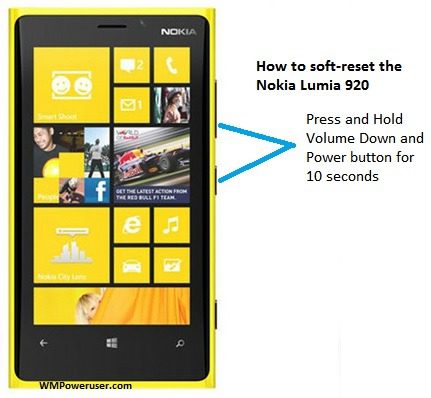
Soft-reset on Window phones
There are two different types of resets for your Windows Phone. Soft reset and hard reset (a.k.a. factory reset). There is a big difference between the two: The hard reset will return your phone to factory settings while the soft reset is more like an extended reboot.

Soft Reset


The soft reset is the same thing as pulling your battery (on devices where that is possible). This method will not remove anything at all from your phone and is completely safe to attempt in any problem situation.
You perform the soft reset by having your phone turned on. Then press and hold thevolume down and Powerbuttons until your phone vibrates and restarts. Note that you should not touch the device screen during the process (not even when the 'slide down to power off' prompt appears).
Example of situations where the soft reset should solve the problem:->.An app that usually starts won't start
->.The camera won't open
->.The device starts using too much battery
->.The device starts behaving oddly

Hard Reset


The hard reset will bring your phone back to factory settings, the same state as when the device was first turned on. All apps, messages, media, personal settings, etc will be removed from the phone. If backup is turned on under Settings, you can restore your apps and settings after performing a hard reset (as long as you initialize the phone with the same Microsoft Account).
Note that resetting your device will not remove any OS or firmware updates. You will remain on the same version of Windows Phone after the reset.
If you can turn on your device you can reset your phone under Settings:Settings > about > reset your phone

This procedure is described in more detailed in this official how-to article.
If your phone is unresponsive and you can't reach Settings, you may be able to reset your phone using the hardware buttons:
I.
Press and hold the volume down and Powerbuttons at the same time until you feel a vibration (about 10–15 seconds).
Ii.
When you feel the vibration, release the buttons, and then immediately press and hold thevolume downbutton until you see a large exclamation mark.
Iii.
Once the exclamation mark appears, press the following four buttons in this order:volume up,volume down,Power,volume down. Your phone should now reset and restart itself. (It might take a while for the reset to finish.)
The hard reset operation will take a while to complete and will show spinning gears before it reboots your device to factory settings. Usually it will finish within 30 minutes but can, in some rare cases, take up to a couple of hours. Some older Nokia Lumia handsets have a bug where a reset never seems to finish. If that should happen to you, check this wiki articlefor a solution.

Example of situations where the hard reset should be used:
->.The soft reset didn't solve the problem
->.You want to switch to another Microsoft Account
->.You want to reset a device that you will no longer use (this enables someone else to initialize the device with their own Microsoft Account)
->.You want to restore a backup

Source: Microsoft | Credit: SmartPhonesTip Officials

extend battery power life on netizenstech
Extending battery life isn't something you can just ignore because its all about smartphones, Lately many users and owners of different tech smartphones do complain about battery life of their devices but now this tutor or tips will help you minimize the actual battery drainage cause on your device, However battery life drainage can be caused by unrelated App issues, un-use of some apps can its the major problems of battery life drainage..

Top three (3) Andriod


Tips Extending Andriod smartphone battery power its pretty easy and simple, because its way to simple and also a powerful standby apps for the Job.
->.Lower Your backlight timing and its brightness for shorter period of time. Lowering your device backlight timing to 30seconds its the most durable time for device backlight and also reduces battery use or life.

HOW TO
->To Lower Your device brightness swipe down -> Settings , and choose lower or click menu -> settings -> display -> backlight -> select. Same steps goes for brightness.

2. Close un-use or kill running apps,
->Closing apps after using is one to two way good to reduce battery usage on device and extended its battery life, leaving apps opens after usage drains battery like hell mostly apps / third party apps such as browser app, creativity apps.
HOW TO
->To kills processes or running Apps can be done in different ways, one is by killing processes manually by you or an app. Hold your device recent app menu key or button to show running apps -> remove all apps -> done or by having App cleaner application or DU device cleaner/ optimizers / booster.

3. Keep your battery connections clean.
->Do you know that Keeping your device battery clean also extends its power life because when its clean its power is 100% active and no obstacle would be in your to enjoy your device and also make sure that Every few weeks, months, use a clean cotton swab / wool or dry linen to clean the metal surface of the battery and the contact of the device.
How Activate To Safe Mode On Blackberry device

Top Four (4) Blackberry Tips


How to extend your battery power to last longer than uptime, you have to follow the instructions below:-

1.Set your BlackBerry® device to turn on and turn off automatically.
->You can set your device to turn off while or when you aint using it for an extended period, like when you sleep. Yeap turning off your phone is one of the major battery life extending cause your data being off doesn't mean all updates woundnt appears once it auto-starts if updates automatically.

HOW TO
->On the Home screen of your device, click the Options icon. Click Device -> Auto On/Off.

2.Setting the backlight timing to remain on for a shorter period of time and also lower its brightness.
-> Setting you backlight timing and brightness also reduces power drain life, because brightness of phone drains device power, you should set it on 0% (zero) for Night mode and allow Automatic Dim light, For Day mode 10% .

HOW TO
->On the Home screen or in a folder, click the Options icon. Click Display > Screen Display.

3.Close application when you are finished with them.
->When you switch from one app to another, some apps / third party, such as the Browser app or the Music app, run in the background, which uses battery power.

HOW TO
->In an app, press the menu key ->then Close.

4-Switch your device to LED notifications to vibrating notifications or sound notifications, and lower the volume of your other sound notifications, and select a shorter ring tone.

HOW TO
->On the Home screen, click the Sound and Alert Profiles icon. Click Change Sounds and Alerts.

5.Keep your battery connections clean.
->Do you know that Keeping your device battery clean also extends its power life because when its clean its power is 100% active and no obstacle would be in your to enjoy your device and also make sure that Every few weeks, months, use a clean cotton swab / wool or dry linen to clean the metal surface of the battery and the contact of the device.

Thanks For visiting us and reading this amazing Tips and Trick / How To post make sure You use the Comments Box later after implementing those steps on Your device hit a feedback to us, if Any problems Encountered don't forget to use the contact Form or E-mail.


How to install a custom fonts on you blackberry device to be added / installed or changed with Your desirable fonts without the help of third-party apps which some times do have errors, corrupt files and hanghook devices, instead of having those issues which may cause damage to your phone, this tutor is for You. And close seeing some error tags [ net_rim_error_peer_] on your device and install it manually so Your BlackBerry device become extremely cool and awesome from the others.
Basicly you can use all type of fonts either its from your computer or by downloading from the internet.
Note: You can install / change fonts in your new or old BlackBerry type (OS4, OS5, OS6, OS7 and OS 10) 100% tested then why upgrading to premuim pro version when you can use it freely.
Therefore, this tutor is to teach you how to change and install a custom font, After you download the font you desire, you must change the font extension from .ttf to .font before you do this tutorial.

Here are best fonts you should test and try using it..

fonts< br/> Download Here

Download Here


Download Here


Download Here


Steps on how install custom font on BlackBerry device

->.Download the font you want to install the file should be in .ttf or if the font is in Zipped format you have to unzip it Using Beam Explorer its a free Version no trail, and make sure you already change the font file extension from .ttf to .font
See more: Don't have Beam Explorer Download one

custom fonts for blackberry devices
->.Run Files application (located in Homescreen or Application folder).

custom fonts for blackberry devices
->.Choose File Folders and go to location of the font downloaded [Media card or Device Storage]. Select the font file that you want to add and click the Menu button and select Copy.

custom fonts for blackberry devices
->.Press Back button, go to Device, and then press Menu button and select Show Hidden.

custom fonts for blackberry devices
->.Go to/Device / appdata / rim /fonts folder. And if the "fonts" folder doesn't exist, create a new folder with that name by clicking Menu button and select New Folder.
custom fonts for blackberry devices *.Install the font by pressing the Menu and select Paste. Repeat the above steps if use want to install multiple fonts on your device. *.Perform a Soft-reset / Hard-reset BlackBerry (remove and insert battery) for soft-reset ( press and hold Alt button + right shifts( Caps lock) and the Del button to soft-reset.

custom fonts for blackberry devices *.After your device restarts, you can now change your font by navigating to menu: Options -> Device -> Screen Display -> Font Family.
Note: - For OS5 and OS6, the font size that can be used is minimum of 10kb to maximum of 90KB and OS 7+ and OS 10 minimum of 50kb to maximum of 200kb. - This tutorial can be used to install any fonts, but there are two things involved either it looks too fushy on your BlackBerry (too big, or too small) or extremely awesome.

Credit:SmartphonesTip
Thanks to visiting us and reading this amazing Tips and Trick / How To post make sure You use the Comments Box later after implementing those steps on Your device hit a feedback to us, if Any problems Encountered don't forget to use the contact Form or E-mail.

how to Start-up your device on safe mode
Safe mode is a device start up without using a third-party which is called default device boot, safe mode starts up your phone without a third-party and even no apps or network just as clean device, Lately many blackberry users have issues about apps and I advises you to run a check on the app you wish to download and not all apps is favourable to your device(s) conditions,
See More How to Soft-reset and Hard reset on Iphone devices.
To Activate safe mode on your Blackberry device is important when it comes to 3rd party Apps issue / problems starting up a safe mode is the only choice and method to resolve some third party apps which causes your device to reboot or restart after reaching the boot end cycle, some third party apps on blackberry do have errors, corrupt files, and to fix them is by deleting immediately or activating safe to do the process, and after downloading and restarting your device the best is to delete or removing the app lastly installed which doesn't run on your device or have a code or pop-up:- net_rim_bb_peer_uber_social_feed All you have to do is delete / remove the App by running a safe mode:

HOW TO
To run a safe mode first you have to perform a soft-reset by Holding and press Alt button + hold right shift (caps lock) + hold del button /key. Or hard-reset by pull and put back battery. After device power up now for safe mode: hold and press Alt button + right shift (caps lock) + esc key (back key at the right of your trackpad or trackball To deactivate Safe-mode restart using You device Using soft or Hard-reset.

Blackberry Priv Marshmallow's Update Released by T-mobile

BlackBerry Priv device owners on T-Mobile have something to look forward to today. Magenta has started rolling out the Marsh-mallow update for this incredible device. This update has been available for unlocked version of this smartphone for quite some time now but carriers always tend to hold them up a bit, Moreover, Priv owners on T-Mobile will be so glad to find out that the carrier is finally sending out the Marsh-mallow update for em.

This Priv is BlackBerry’s first Android-powered Mobile phone. Never has blackberry phone's company released a smartphone that did not run on it's own Operating System(OS). BlackBerry switched gears with the Priv but it didn’t do quite as well as it might have hoped.
Blackberry Priv Marshmallow Update Turns up Released by T-mobile on Netizenstech.blogspot.nl
Recent reports suggest that AT&T is seeing customers regularly return their Priv phone, revealing that the device is not performing so well according to the features. Another indication of its sluggish performance was when about a week ago T-Mobile said that it has suspended online sales of the Priv.
This latest update Pop- up the T-Mobile BlackBerry Priv to Android version 6.0.1/- build AAE153. It brings everything that’s a part of Marshmallow, including better and authorized application permissions, Doze mode, adaptable storage, user interface tweaks, and more. Also included with the update performance and stability enhancements.
T-Mobile is rolling out the update over-the-air and it should go live for all users soon.

Stay Updated: Tutorial video loading on How to update Blackberry Marshmallow

You should Read more on and about Techs updates, Gists, How to, Tips and tricks, Smartphones reviews and Specs.

Source: Support.t-mobile | Credits: SmartphonesTip Officials

Blackberry Priv Marshmallow Update Turns up Released by T-mobile on Netizenstech.blogspot.nl

Blackberry Priv Marshmallow's Update Released by T-mobile

BlackBerry Priv device owners on T-Mobile have something to look forward to today. Magenta has started rolling out the Marsh-mallow update for this incredible device. This update has been available for unlocked version of this smartphone for quite some time now but carriers always tend to hold them up a bit, Moreover, Priv owners on T-Mobile will be so glad to find out that the carrier is finally sending out the Marsh-mallow update for em.

This Priv is BlackBerry’s first Android-powered Mobile phone. Never has blackberry phone's company released a smartphone that did not run on it's own Operating System(OS). BlackBerry switched gears with the Priv but it didn’t do quite as well as it might have hoped.
Blackberry Priv Marshmallow Update Turns up Released by T-mobile on Netizenstech.blogspot.nl
Recent reports suggest that AT&T is seeing customers regularly return their Priv phone, revealing that the device is not performing so well according to the features. Another indication of its sluggish performance was when about a week ago T-Mobile said that it has suspended online sales of the Priv.
This latest update Pop- up the T-Mobile BlackBerry Priv to Android version 6.0.1/- build AAE153. It brings everything that’s a part of Marshmallow, including better and authorized application permissions, Doze mode, adaptable storage, user interface tweaks, and more. Also included with the update performance and stability enhancements.
T-Mobile is rolling out the update over-the-air and it should go live for all users soon.

Stay Updated: Tutorial video loading on How to update Blackberry Marshmallow

You should Read more on and about Techs updates, Gists, How to, Tips and tricks, Smartphones reviews and Specs.

Source: Support.t-mobile | Credits: Netizenstech Officials

Safe mode on Netizenstech
Safe mode is a device start up without using a third-party which is called default device boot, safe mode starts up your phone without a third-party and even no apps or network just as clean device, Lately many blackberry users have issues about apps and I advises you to run a check on the app you wish to download and not all apps is favourable to your device(s) conditions,
See More How to Soft-reset and Hard reset on Iphone devices.
To Activate safe mode on your Blackberry device is important when it comes to 3rd party Apps issue / problems starting up a safe mode is the only choice and method to resolve some third party apps which causes your device to reboot or restart after reaching the boot end cycle, some third party apps on blackberry do have errors, corrupt files, and to fix them is by deleting immediately or activating safe to do the process, and after downloading and restarting your device the best is to delete or removing the app lastly installed which doesn't run on your device or have a code or pop-up:- net_rim_bb_peer_uber_social_feed All you have to do is delete / remove the App by running a safe mode:
HOW TO To run a safe mode first you have to perform a soft-reset by Holding and press Alt button + hold right shift (caps lock) + hold del button /key. Or hard-reset by pull and put back battery. After device power up now for safe mode: hold and press Alt button + right shift (caps lock) + esc key (back key at the right of your trackpad or trackball To deactivate Safe-mode restart using You device Using soft or Hard-reset.


How to install a custom fonts on you blackberry device to be added / installed or changed with Your desirable fonts without the help of third-party apps which some times do have errors, corrupt files and hanghook devices, instead of having those issues which may cause damage to your phone, this tutor is for You. And close seeing some error tags [ net_rim_error_peer_] on your device and install it manually so Your BlackBerry device become extremely cool and awesome from the others.
Basicly you can use all type of fonts either its from your computer or by downloading from the internet.
Note: You can install / change fonts in your new or old BlackBerry type (OS4, OS5, OS6, OS7 and OS 10) 100% tested then why upgrading to premuim pro version when you can use it freely.
Therefore, this tutor is to teach you how to change and install a custom font, After you download the font you desire, you must change the font extension from .ttf to .font before you do this tutorial.

Here are best fonts you should test and try using it..

fonts
Download Here

Download Here

Download Here

Download Here


Steps on how install custom font on BlackBerry device

->.Download the font you want to install the file should be in .ttf or if the font is in Zipped format you have to unzip it Using Beam Explorer its a free Version no trail, and make sure you already change the font file extension from .ttf to .font
See more: Don't have Beam Explorer Download one

custom fonts for blackberry devices
->.Run Files application (located in Homescreen or Application folder).

custom fonts for blackberry devices
->.Choose File Folders and go to location of the font downloaded [Media card or Device Storage]. Select the font file that you want to add and click the Menu button and select Copy.

custom fonts for blackberry devices
->.Press Back button, go to Device, and then press Menu button and select Show Hidden.

custom fonts for blackberry devices
->.Go to/Device / appdata / rim /fonts folder. And if the "fonts" folder doesn't exist, create a new folder with that name by clicking Menu button and select New Folder.
custom fonts for blackberry devices *.Install the font by pressing the Menu and select Paste. Repeat the above steps if use want to install multiple fonts on your device. *.Perform a Soft-reset / Hard-reset BlackBerry (remove and insert battery) for soft-reset ( press and hold Alt button + right shifts( Caps lock) and the Del button to soft-reset.

custom fonts for blackberry devices *.After your device restarts, you can now change your font by navigating to menu: Options -> Device -> Screen Display -> Font Family.
Note: - For OS5 and OS6, the font size that can be used is minimum of 10kb to maximum of 90KB and OS 7+ and OS 10 minimum of 50kb to maximum of 200kb. - This tutorial can be used to install any fonts, but there are two things involved either it looks too fushy on your BlackBerry (too big, or too small) or extremely awesome.

Credit: Netizenstech
Thanks to visiting us and reading this amazing Tips and Trick / How To post make sure You use the Comments Box later after implementing those steps on Your device hit a feedback to us, if Any problems Encountered don't forget to use the contact Form or E-mail.

extend battery power life on netizenstech
Extending battery life isn't something you can just ignore because its all about smartphones, Lately many users and owners of different tech smartphones do complain about battery life of their devices but now this tutor or tips will help you minimize the actual battery drainage cause on your device, However battery life drainage can be caused by unrelated App issues, un-use of some apps can its the major problems of battery life drainage..

Top three (3) Andriod


Tips Extending Andriod smartphone battery power its pretty easy and simple, because its way to simple and also a powerful standby apps for the Job.
->.Lower Your backlight timing and its brightness for shorter period of time. Lowering your device backlight timing to 30seconds its the most durable time for device backlight and also reduces battery use or life.

HOW TO
->To Lower Your device brightness swipe down -> Settings , and choose lower or click menu -> settings -> display -> backlight -> select. Same steps goes for brightness.

2. Close un-use or kill running apps,
->Closing apps after using is one to two way good to reduce battery usage on device and extended its battery life, leaving apps opens after usage drains battery like hell mostly apps / third party apps such as browser app, creativity apps.

HOW TO
->To kills processes or running Apps can be done in different ways, one is by killing processes manually by you or an app. Hold your device recent app menu key or button to show running apps -> remove all apps -> done or by having App cleaner application or DU device cleaner/ optimizers / booster.

3. Keep your battery connections clean.
->Do you know that Keeping your device battery clean also extends its power life because when its clean its power is 100% active and no obstacle would be in your to enjoy your device and also make sure that Every few weeks, months, use a clean cotton swab / wool or dry linen to clean the metal surface of the battery and the contact of the device.
How Activate To Safe Mode On Blackberry device

Top Four (4) Blackberry Tips


How to extend your battery power to last longer than uptime, you have to follow the instructions below:-

1.Set your BlackBerry® device to turn on and turn off automatically.
->You can set your device to turn off while or when you aint using it for an extended period, like when you sleep. Yeap turning off your phone is one of the major battery life extending cause your data being off doesn't mean all updates woundnt appears once it auto-starts if updates automatically.

HOW TO
->On the Home screen of your device, click the Options icon. Click Device -> Auto On/Off.

2.Setting the backlight timing to remain on for a shorter period of time and also lower its brightness.
-> Setting you backlight timing and brightness also reduces power drain life, because brightness of phone drains device power, you should set it on 0% (zero) for Night mode and allow Automatic Dim light, For Day mode 10% .

HOW TO
->On the Home screen or in a folder, click the Options icon. Click Display > Screen Display.

3.Close application when you are finished with them.
->When you switch from one app to another, some apps / third party, such as the Browser app or the Music app, run in the background, which uses battery power.

HOW TO
->In an app, press the menu key ->then Close.

4-Switch your device to LED notifications to vibrating notifications or sound notifications, and lower the volume of your other sound notifications, and select a shorter ring tone.

HOW TO
->On the Home screen, click the Sound and Alert Profiles icon. Click Change Sounds and Alerts.

5.Keep your battery connections clean.
->Do you know that Keeping your device battery clean also extends its power life because when its clean its power is 100% active and no obstacle would be in your to enjoy your device and also make sure that Every few weeks, months, use a clean cotton swab / wool or dry linen to clean the metal surface of the battery and the contact of the device.

Thanks For visiting us and reading this amazing Tips and Trick / How To post make sure You use the Comments Box later after implementing those steps on Your device hit a feedback to us, if Any problems Encountered don't forget to use the contact Form or E-mail.

Soft and hard reset on Netizenstech
Soft-reset on Window phones
There are two different types of resets for your Windows Phone. Soft reset and hard reset (a.k.a. factory reset). There is a big difference between the two: The hard reset will return your phone to factory settings while the soft reset is more like an extended reboot.

Soft Reset


The soft reset is the same thing as pulling your battery (on devices where that is possible). This method will not remove anything at all from your phone and is completely safe to attempt in any problem situation.
You perform the soft reset by having your phone turned on. Then press and hold thevolume down and Powerbuttons until your phone vibrates and restarts. Note that you should not touch the device screen during the process (not even when the 'slide down to power off' prompt appears).
Example of situations where the soft reset should solve the problem:->.An app that usually starts won't start
->.The camera won't open
->.The device starts using too much battery
->.The device starts behaving oddly

Hard Reset


The hard reset will bring your phone back to factory settings, the same state as when the device was first turned on. All apps, messages, media, personal settings, etc will be removed from the phone. If backup is turned on under Settings, you can restore your apps and settings after performing a hard reset (as long as you initialize the phone with the same Microsoft Account).
Note that resetting your device will not remove any OS or firmware updates. You will remain on the same version of Windows Phone after the reset.
If you can turn on your device you can reset your phone under Settings:Settings > about > reset your phone

This procedure is described in more detailed in this official how-to article.
If your phone is unresponsive and you can't reach Settings, you may be able to reset your phone using the hardware buttons:
I.
Press and hold the volume down and Powerbuttons at the same time until you feel a vibration (about 10–15 seconds).
Ii.
When you feel the vibration, release the buttons, and then immediately press and hold thevolume downbutton until you see a large exclamation mark.
Iii.
Once the exclamation mark appears, press the following four buttons in this order:volume up,volume down,Power,volume down. Your phone should now reset and restart itself. (It might take a while for the reset to finish.)
The hard reset operation will take a while to complete and will show spinning gears before it reboots your device to factory settings. Usually it will finish within 30 minutes but can, in some rare cases, take up to a couple of hours. Some older Nokia Lumia handsets have a bug where a reset never seems to finish. If that should happen to you, check this wiki articlefor a solution.

Example of situations where the hard reset should be used:
->.The soft reset didn't solve the problem
->.You want to switch to another Microsoft Account
->.You want to reset a device that you will no longer use (this enables someone else to initialize the device with their own Microsoft Account)
->.You want to restore a backup

Source: Microsoft | Credit: Netizenstech Officials

how to take a screenshot on iphones device
Do you really want to capture and save a screenshot from your iPhone to share with friends, Mail or boost about your device Apps or as wallpaper, here is an amazing trick to take shot on your iphone.
See more: How to Take Screenshot On Andriod Devices
Simply hold down the Home button and then press and release the Sleep button.
screenshot on Iphones
Image Credit: 4mobiles
We advise You to enable your device sound on and not on silents nor vibrate once the sound is on you will hear a click sound onces your screenshot is taken., The screen will also Blink / flash on and off for a brief second, Then your screenshot is now saved in the Photos app where you can email it to a friend, Share or use it as wallpaper.

iphones on Netizenstech
Everybody loves his or her Smartphones, Ipad, iPhones and Tablet. These Amazing little Iphone devices are so much more than just a common cell phone, They are fully Packaged computers in a small shapes and sizes, But Unfortunately, You know every device such as computers they do sometimes Hang, Apps issues, Freezings All You have to do is perform a little but mighty soft-reset on Your Ipone to boots and get going again Enjoying smartlife.
The easiest way to perform this is to do what is called and known as Soft Reset. You don’t have to worry, none of your applications, data or settings will be lost, A Soft Reset will simply clear the iPhone’s memory, reset all of the operating system software routines (Ossr) and Permit things to start fresh and normal. Just like we often turn off our Macs or PCs from time to time, it’s often a good idea to do the same with our iPhones.
See more: How to Capture. A Screenshot On Iphone Devices

Soft Reset on the iPhone


To do a Soft Reset simply press and hold the Home button and at the same time press and hold the Sleep button.
Soft-reset on Iphone
A Red arrow with the text “slide to power off” will appear. Slide the red arrow to complete the soft-reset.
See more: How to Enable Safe mode on Blackberry Device
See more: How to perform a Soft reset on Andriod Device
See more: How to perform a Soft reset on Windows Device

±.Hard Reset — Turning the iPhone Off
You can completely power the iPhone down by doing a Hard Reset. Press and hold the Home button and the Sleep button at the same time for at least ten seconds, until the Apple logo appears. None of your applications, data or settings will be lost. This is a good way to conserve power and also to completely reset the iPhone.

Tech Todays on Netizenstech


In industrial manufacturing, machine-to-machine communications allows sensors in one place to communicate with control systems for an automated response.
For example, if the temperature in a commercial food processor reached a critical high, a sensor could send that information through a supervisory control and data acquisition system. In response, the control system could trigger a cooling system to bring the temperature down. No human interaction was necessary and plant operations sailed along without any downtime.

To allow these communications, devices had to be connected to each other and to larger systems using standard protocols like wifi, Bluetooth and Zigbee. These systems are referred to as the industrial Internet of Things (IoT).
While the industrial IoT got an earlier start, the consumer IoT is not far behind and it is going to be big. Really big.

Reimagining the Point of Sale


Using many of the same underlying technologies, the consumer IoT gives merchandisers a whole new perception of what ‘place’ even means in the multi-channel universe. Coffee makers, laundry machines, fridges, stoves, cars, watches, smart home monitors and many other items will become customer touchpoints.
The consumer IoT ushers in an era of personal, contextualized selling opportunities, allowing companies to place purchases right into the context of when and where people use an Internet-connected device. Say for example your company manufactures refrigerators. When the milk runs out, people can simply push a button on the fridge to reorder more. The milk can be delivered alone, or along with other commonly ordered items on a standard grocery list – all sourced and delivered by your local grocery partner.
If you manufacture almost any product, now is the time your organization should consider supporting this kind of transaction – right from the product itself.
Manufacturers are Doing it Already

Samsung’s new Family Hub refrigerator is one of the early entrants in the consumer IoT. The Family Hub comes with what looks like a tablet screen on its front door. Built-in apps connect to various services through the home WiFi network. To keep your fridge supplied, two apps let you order food directly from the screen. Instacart, a US national online grocery delivery service, will deliver to your front door in under an hour. Groceries by MasterCard lets you order online from leading retailers like Fresh Direct and ShopRite.

There are also three webcams inside the fridge. They take a photo of the contents when
one of the doors closes. So if you’re at the store and can’t remember whether or not you have milk, you can look through the smartphone app to check.
GE has been adding functionality to get more out of their appliances, connecting their washers, dryers and dishwashers to more than a hundred other applications including Facebook, Twitter, smart lighting, and various other smart home products.
Millions of New Customer Touchpoints

Basically appliances are going to be more software intensive and connected. Consumers will be able to buy “apps” for their washing machines, which means they could actually change the things it can perform. Building connectivity into products allows companies to communicate with customers in new, meaningful ways.
Send them alerts on their coffee maker each month reminding them they need to descale their machine. Provide the details of the procedure to make it easy. Send them discounts and coupons they can take advantage of right from the machine.
It’s not just appliances either. No matter the industry, businesses everywhere will need to adapt to the changing demands of consumers due to the consumer Internet of Things. Thinking about the extended ecosystem required to allow the consumer Internet of Things to flourish, there are a couple of classic technology pain points that companies are going to have to address.

Handling Multi-Channel Commerce
From a brand and customer experience point of view, selling through multiple channels—in-store, online, through a mobile app, via Facebook—presents challenges enough. Now think about how your back end commerce systems might handle the sale of food items from a local grocer via your refrigerator interface.

These kinds of transactions make commerce and transaction systems even more complex – and they must feed information to back end systems of record like CRM and ERP. If you thought that the integration effort was ridiculous when there were only five channels, think about it when you add even just ten internet-connected products and thousands of people buy them. The challenge here is to ensure that the commerce system you choose moving forward is capable of adding new sales channels without the massive integration efforts of the past.

Buddy Up or Go Vertical
From a partnership perspective, the consumer IoT opens massive new opportunities. Who are you going to partner with to sell coffee from your coffeemaker? Which brands in which cities will you support? Or will the coffee arrive via UPS or Fedex from a central location?
If you are a car manufacturer and the tire tread detector senses they need replacement, do you recommend the factory choice? Or spread the love to other tire manufacturers? When the car alerts a driver to the fact that they need more gas and drivers search for a nearby station from their car interface, do you promote all brands equally?
Depending on how brands work together, the consumer IoT might be the driver for mergers due to attractive economies of scale resulting from vertical integration.
Get Connected

More and more consumer devices are being connected. The IoT gives marketers a whole new perception of what ‘place’ even means in the multi-channel universe. Think about how your products might fulfill customer wishes to make their lives easier. Then build that service right into your products.
With the right underlying back-end commerce platform, adding new channels is easy, so the only limitation is your imagination and your ability to conceive of your products in a booming consumer IoT


Source: Techvibes

Author Name

Contact Form

Name

Email *

Message *

Powered by Blogger.